백준 알고리즘 문제(C++) #1000
2020. 6. 30. 18:29
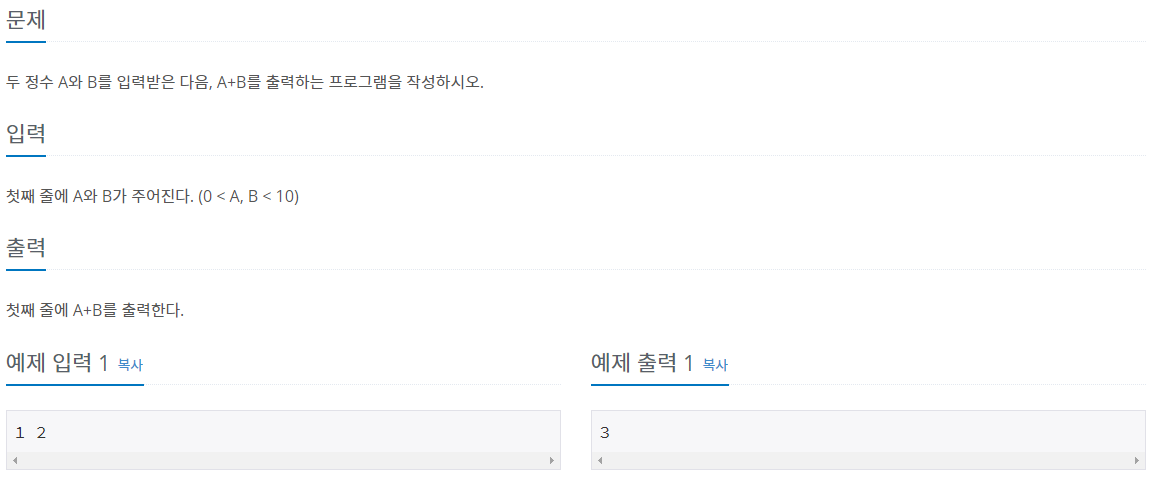
#include<stdio.h>
#pragma warning(disable 4996) // scanf 사용시 버퍼오버플로우 경고 무시

int main(void) {
    int a,b = 0;
    scanf("%d",&a);
    scanf("%d",&b);
    printf("%d",a+b);
}
'Programming > Algorithm' 카테고리의 다른 글
| SCPC 예제 #Day 1# (0) | 2017.12.27 |
|---|
안드로이드 #12 ScrollView 안에 RecyclerView 사용하기
2020. 6. 10. 11:05
앱을 만들다 보면 ScrollView 안에 RecyclerView를 사용할 때가 있다.
예를 들면, 커뮤니티에서 사용하는 게시판이 있다.
그런데 ScrollView 안에 RecylcerView를 사용하게 되면
ScrollView의 스크롤
RecyclerView의 스크롤이 따로따로 다 움직이게 된다.
이를 해결하기 위해서는
ScrollView를 NestedScrollView로 사용하면 된다
<androidx.core.widget.NestedScrollView
        android:layout_width="match_parent"
        android:layout_height="match_parent">

    <LinearLayout
            android:orientation="vertical"
            android:layout_width="match_parent"
            android:layout_height="wrap_content">

        <androidx.recyclerview.widget.RecyclerView
                android:id="@+id/recyclerView"
                android:layout_width="match_parent"
                android:layout_height="wrap_content"/>

    </LinearLayout>

</androidx.core.widget.NestedScrollView>'Programming > Android' 카테고리의 다른 글
| 안드로이드#11 툴바 타이틀 가운데 정렬 (0) | 2020.05.11 |
|---|---|
| 안드로이드#10 툴바 뒤로가기 버튼 만들기 (0) | 2020.05.11 |
| 안드로이드 #9 AlertDialog 외부화면 클릭, 뒤로가기 클릭시 Dismiss 막기 (0) | 2020.05.08 |
| 안드로이드 #8 뒤로가기 버튼 두번눌러서 종료 / onBackPressed() (0) | 2020.05.08 |
| 안드로이드 #7 Layout ClickListener 사용하기 (0) | 2020.05.08 |
안드로이드#11 툴바 타이틀 가운데 정렬
2020. 5. 11. 23:19
먼저 기존에 있는 타이틀을 제거 해야한다
Toolbar toolbar = findViewById(R.id.toolbar);
setSupportActionBar(toolbar);
getSupportActionBar().setDisplayShowTitleEnabled(false);
그후 xml 에서
 <androidx.appcompat.widget.Toolbar
        android:id="@+id/toolbar"
        android:layout_width="match_parent"
        android:layout_height="wrap_content"
        android:background="@null"
        android:theme="?attr/actionBarTheme"
        app:titleTextAppearance="@style/ToolbarTitleText" >

        <TextView
            android:id="@+id/textView28"
            android:layout_width="wrap_content"
            android:layout_height="wrap_content"
            android:text="Toolbar Title"
            android:layout_gravity="center"
            android:textColor="#000000"
            android:textSize="15dp"
            android:textStyle="bold" />
    </androidx.appcompat.widget.Toolbar>
여기서 중요한것은 TextView 의 android:layout_width 를 wrap_content로 해주는것과
android:layout_gravity="center" 로 지정하는것이다
'Programming > Android' 카테고리의 다른 글
| 안드로이드 #12 ScrollView 안에 RecyclerView 사용하기 (0) | 2020.06.10 |
|---|---|
| 안드로이드#10 툴바 뒤로가기 버튼 만들기 (0) | 2020.05.11 |
| 안드로이드 #9 AlertDialog 외부화면 클릭, 뒤로가기 클릭시 Dismiss 막기 (0) | 2020.05.08 |
| 안드로이드 #8 뒤로가기 버튼 두번눌러서 종료 / onBackPressed() (0) | 2020.05.08 |
| 안드로이드 #7 Layout ClickListener 사용하기 (0) | 2020.05.08 |